Side by side
Each pair starts from the same photo and the same product image. The overlay is the tool's own default placement on the shoulders, saved with Download PNG, with no retouching. The try-on was made with FitInView's try-on from the same two images. Drag the divider, or use the slider under the picture.
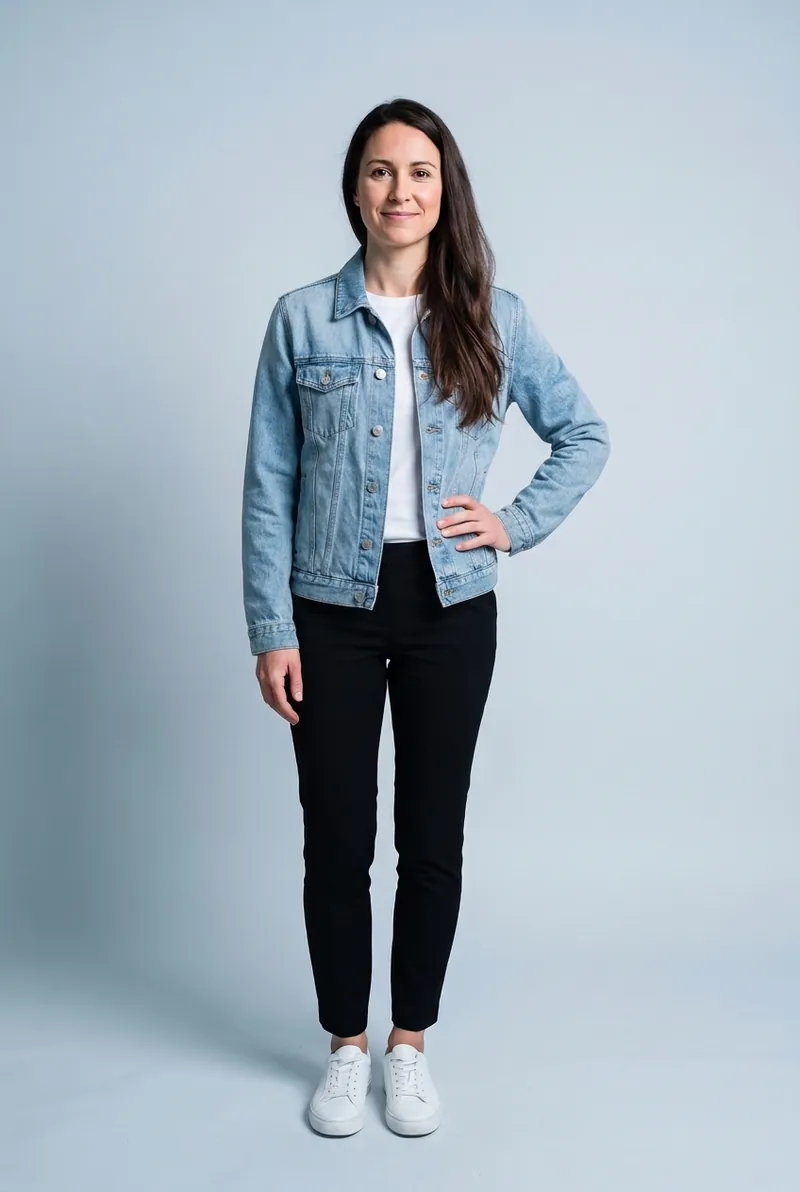
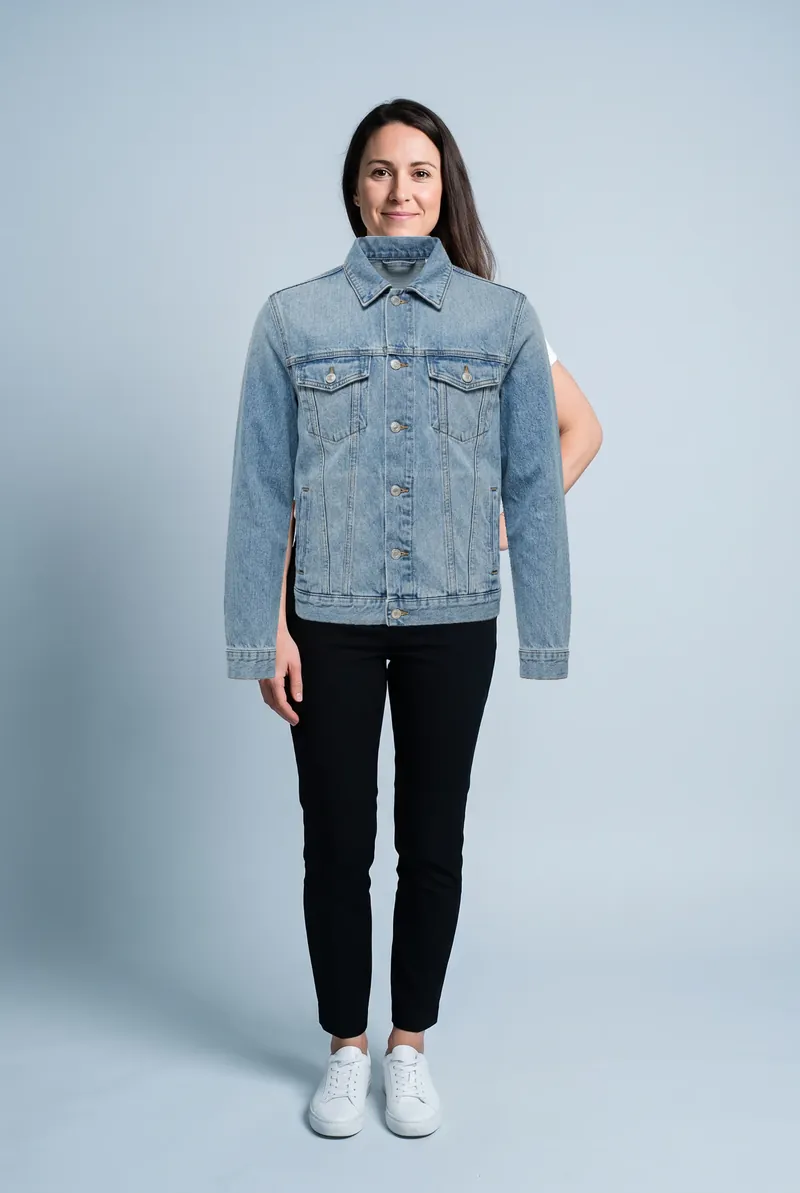
Watch the hand on her hip and the hair over her shoulder: the overlay pastes over both, the try-on keeps them in front.
How each one works
An overlay is two pictures stacked. The garment cutout is moved, scaled, rotated and blended, but its pixels never change shape. What you see is exactly the product photo, laid on top of your photo. That is why it is fast, private and completely predictable, and also why it can't bend.
An AI try-on redraws the photo. An image model receives your photo and the garment image and produces a new picture in which you are wearing the garment: the fabric is drawn following your shoulders and hips, under your hair and behind your hands, in the light of your photo. The result is a generated image, a plausible picture rather than a measurement, so small details such as button counts or the exact scale of a print are worth checking against the product photo.
Five things an overlay can't do
Drape
A satin slip dress on a mannequin is a flat column. On a body it skims the hips, pulls slightly at the bust and folds at the waist. An overlay keeps the mannequin's shape, so it can't tell you whether something clings, swings or sits away from you. In the slip dress comparison, notice how the overlay keeps a straight outline while the try-on follows the hips.
Go behind arms, hands and hair
Everything in an overlay goes on top. A hand on the hip ends up under the jacket, long hair over the shoulder disappears beneath the collar, and an arm held in front of the body is covered by the sleeve of the garment. Printers would call this a knockout problem: the top sheet has no hole where something should show through. The denim jacket pair shows both the hand and the hair.
Take off what you are wearing
An overlay can only add. A strappy dress laid over a t-shirt leaves the t-shirt sleeves showing, and a skirt over trousers leaves the trouser legs below the hem. A try-on replaces the outfit, so bare shoulders and legs appear where the garment ends. If you use an overlay for dresses and skirts, a photo in a fitted vest top and shorts or leggings keeps this problem small.
Match the light
The garment keeps the even studio lighting it was photographed in. If your photo has warm window light from the left, the garment still looks lit from the front by a cool flash. Multiply blending borrows some of your photo's shading, but it can't add a highlight where satin would catch the light or a shadow under a lapel.
Tell you about fit
Scaling a cutout to your shoulders shows the garment's proportions at that scale, not how a particular size will fit you. To be fair, the same is true of an AI try-on: it shows a plausible fit for your body in the picture, not a size recommendation. For fit, the shop's measurements and your own tape measure are still the real answer.
What an overlay does well
- Color against your face. A big block of the real product color next to your skin and hair, in your own photo, is the quickest way to rule a shade in or out. This is where an overlay is genuinely good.
- A rough length check. With the shoulders registered, you can see whether a coat lands above or below the knee on you, and compare two lengths directly.
- Quick combinations. Three coats over one dress, or two skirts with one sweater, takes about a minute, and you can layer garments the way you would wear them.
- Privacy and no account. The overlay tool here runs entirely in your browser; your photo is never uploaded.
- Total predictability. Nothing is invented. What you see is the product photo, untouched.
Summary table
| Question | Manual overlay | AI try-on |
|---|---|---|
| Is this color good on me? | Yes, as long as Multiply is off over colored clothes | Yes, in the light of your photo |
| Roughly where does it end? | Roughly, after registering the shoulders | Roughly, drawn on your body |
| How does the fabric hang? | No, it stays flat | Shown as a plausible drape |
| Arms, hands, hair in front | Covered by the garment | Kept in front |
| Replace what I'm wearing | No, it only adds | Yes |
| Will this size fit? | No | No, check measurements |
| Photo stays on my device | Yes with this tool | No, it is processed online (private to your account at FitInView) |
| Needs an account | No | Yes, a free account includes the first try-on |
Which to use when
- Choosing between two colors of the same sweater: overlay. Color is its strength, and a fitted sweater does not drape much.
- Wondering whether a slip dress or a jersey wrap will cling: AI try-on. That is a draping question.
- Planning which of your coats goes with a new dress: overlay, with the dress at the bottom of the layer list.
- Buying a structured blazer or a coat with a big collar online: AI try-on for the look on your shoulders, the size chart for the fit.
- Anything where your arms or hair would cover part of the garment, like a cropped jacket worn with hands in pockets: AI try-on.
Using both
The two work well in sequence. Use the overlay to shortlist: drop ten colors and cuts onto your photo, keep the two or three that work with your coloring. Then look at the finalists properly, draped on your body, before you order. The same base photo works for both, which keeps the comparison fair.